
Computer Networking fundamentals: how devices connect and communicate
Computer networking has always been an interest of mine besides Software Engineering, it's actually the reason I studied IT in college, which covered a lot of networking concepts. Becoming a Network Engineer was always a career option for me, and I'm on a journey to learn as much as I can about it. I'm going to use this note to write about everything I pick up along the way. It'll be a continuous thing, so I'll be adding bits to it pretty much every day. If you spot any mistakes in my notes, please feel free to edit this note (scroll down for details).
What is a Computer Network?
A computer network is a system of connected devices that communicate to exchange data and resources. These devices can be your phone, computer, printer, servers, and so on. They can be connected either wirelessly or through a wired connection. A good example of a computer network is your home, where all your devices connect to your router. This is what's known as a local area network (LAN), which I'll cover later.
Key components of network
- Nodes - The physical devices on a network.
- Connectivity Hardware - The devices whose job is to route, filter and manage traffic across the network, so think Switches, Routers and Modems.
- Transmission Media - The pathway that's used to transport data packets between connected nodes on a network.
- Protocols - The established rules that specify exactly how data packets must be structured, transmitted and received.
Types of Computer Network Architecture:
The two primary types of network architecture are Peer-to-Peer (P2P) and Client-Server.
Client-Server
A system where the client nodes request data or resources from a server. The client's job is to initiate the requests, while the server stores the data and resources and processes those requests. The main advantage of this system is that it gives you a centralized place for data management, along with better security control. One of the major disadvantages is that if the server fails, all the connected client nodes are affected by it.
Peer-to-Peer
A system where devices on a network can communicate directly with each other without relying on a central server. Think of your home network, where you can share any file with other connected devices. The main advantage of this system is that there isn't a single point of failure, unlike with the client-server architecture. One disadvantage is that it's harder to manage and secure, so it's probably not the best architecture if an organization needs to control the resources on their network.
Which component of a computer network establishes the rules for exactly how data packets must be structured, transmitted and received?
The OSI Model
OSI stands for Open Systems Interconnection. It's a conceptual model that explains how data travels from one computer to another over a network. The OSI model breaks network communication down into 7 layers, each with its own specific purpose.
Here's a diagram of all the layers in the OSI model:
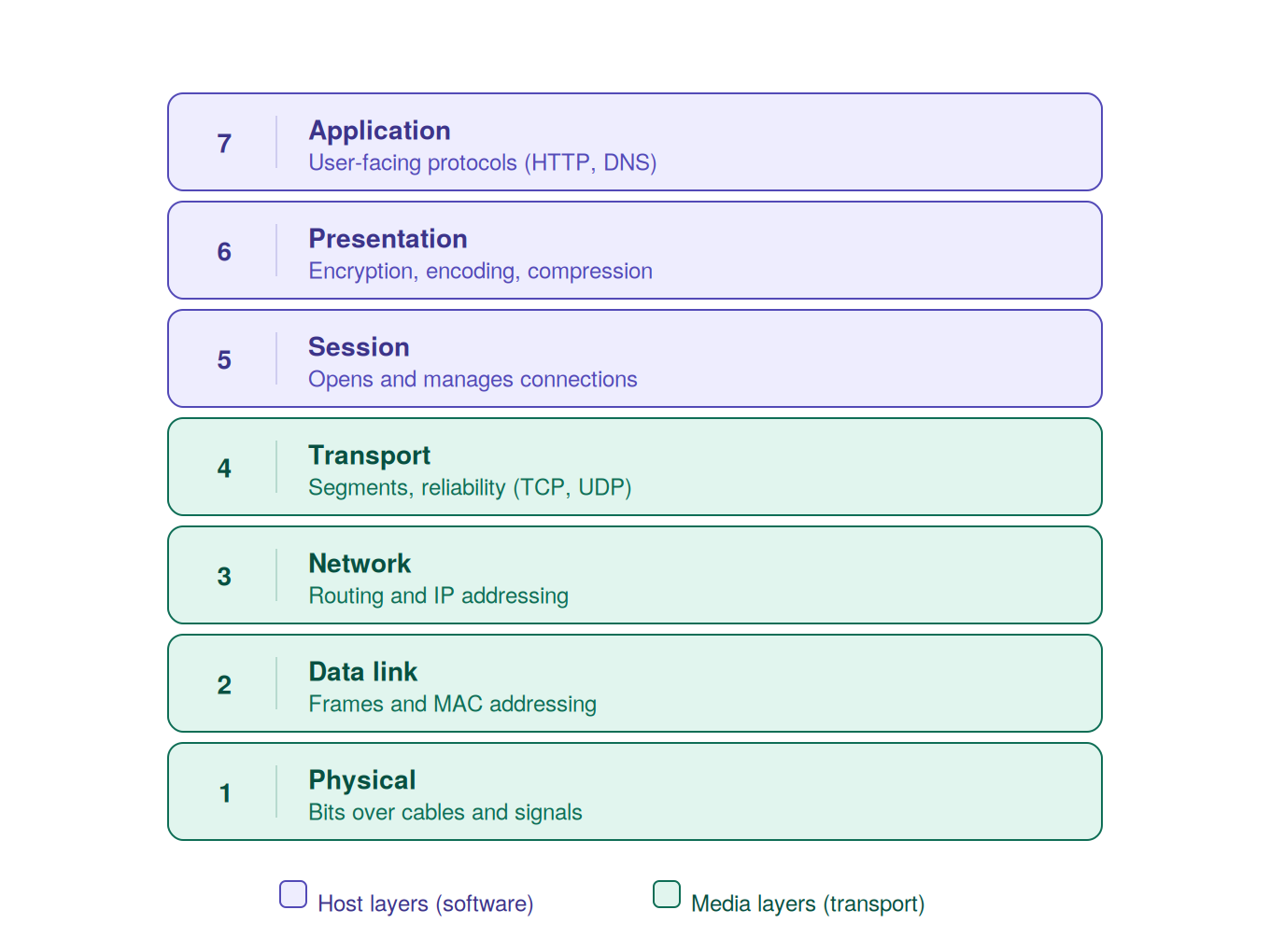
I'll come to this to add explanations of all the layers.
...
The TCP/IP Model
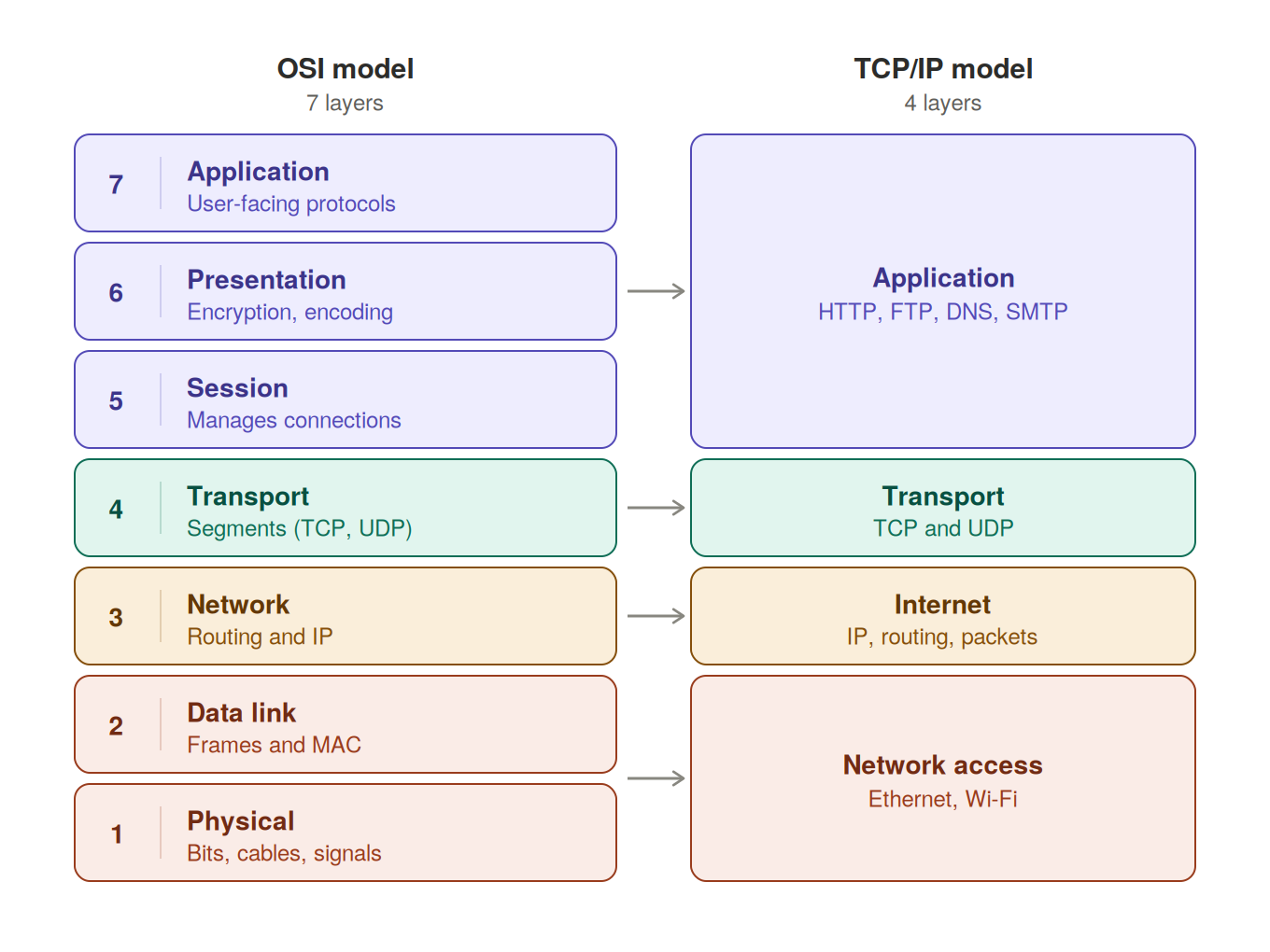
The TCP/IP (Transmission Control Protocol/Internet Protocol) model is the networking model that's actually used on the Internet, and it dictates how data is routed and received. It's simpler than the OSI model and only consists of 4 layers.
Here's the comparison between the OSI & TCP/IP model:
Network Topologies
The two main types of network topologies:
Physical Topology
Refers to the physical arrangement of hardware such as devices, switches & cables, and how they're physically connected.
Logical Topology
Describes how data actually flows through a network, regardless of its physical layout.
Wired Network Topologies
Ring Topology
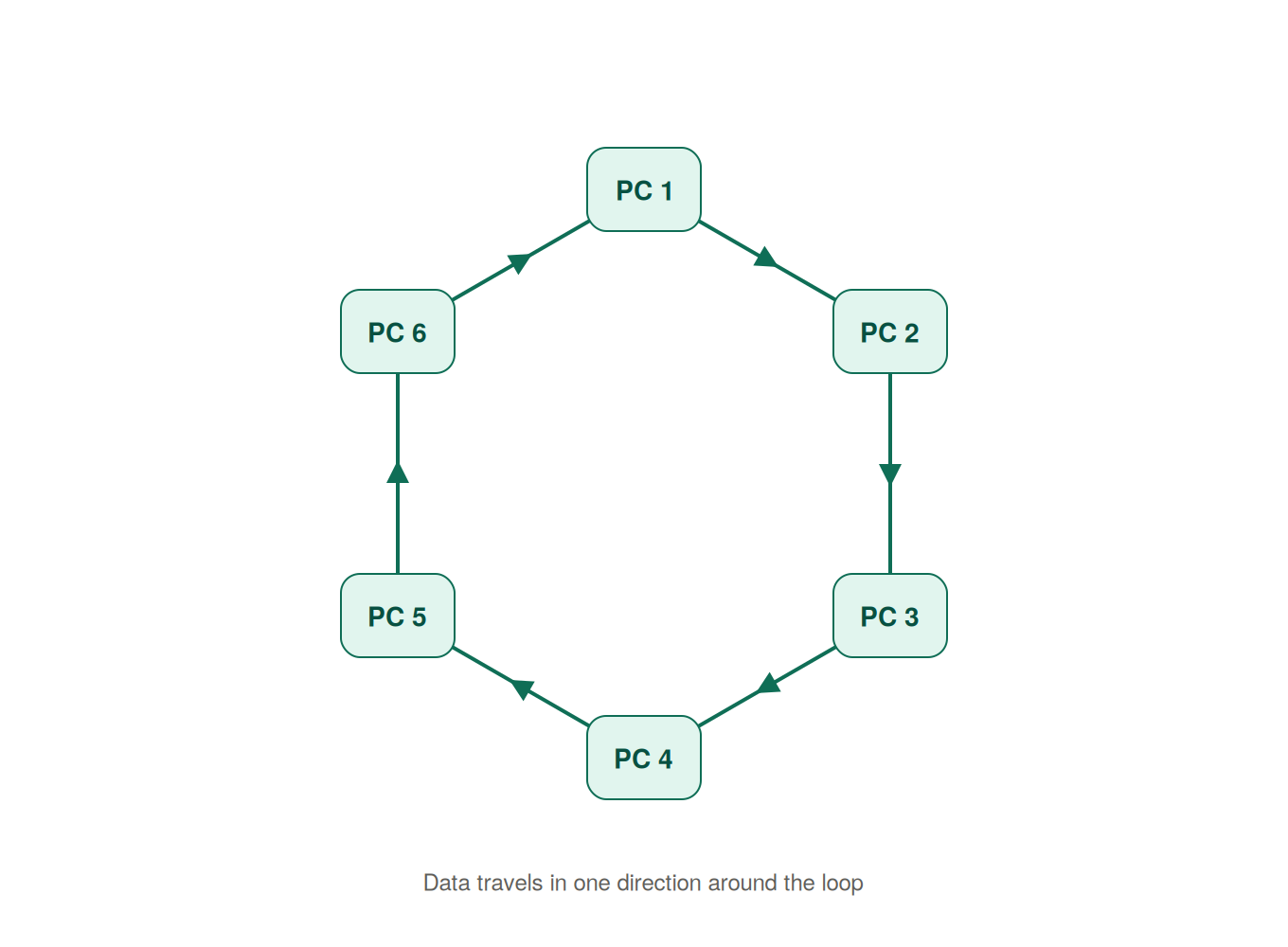
All devices on a network are connected in a circular fashion, where each node has exactly two neighbors. One drawback of a single ring is that there's a single point of failure, a single broken cable can disrupt the flow of the whole network. A dual ring solves this by adding a second connection so data can travel both ways, giving you redundancy and high availability.
Star Topology
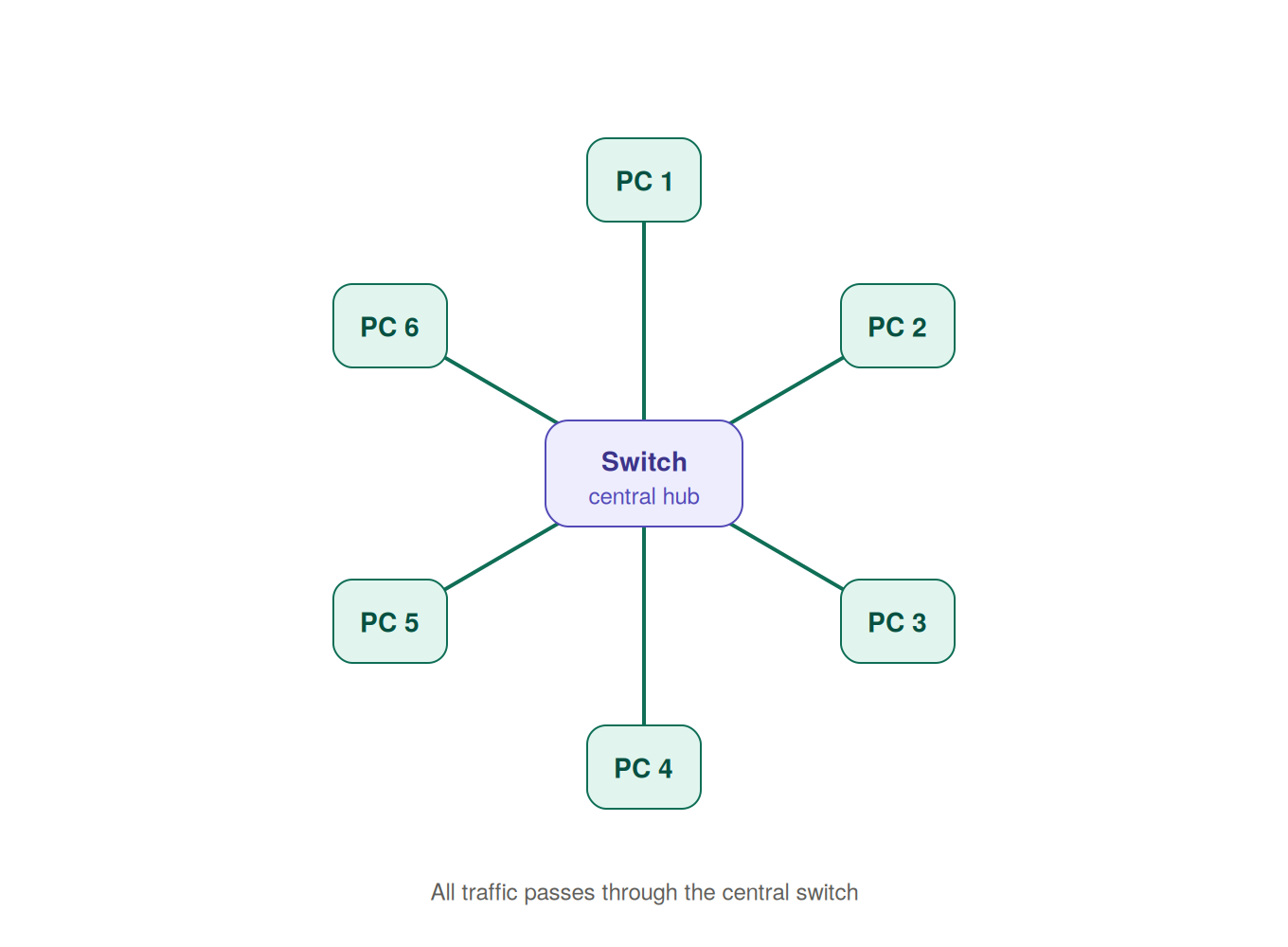
Star topologies are Local Area Networks (LAN) where devices are connected to a central device, usually a switch or hub. One advantage of this topology is that it's easy to manage, since adding or removing devices is quite straightforward. A drawback is that there's a single point of failure, so if the switch or hub fails then the entire network goes down.
Hubs aren't typically used nowadays and have largely been replaced by switches.
Mesh Topology
A Mesh topology is a network where devices are connected to multiple other devices. There are two types of mesh topologies, Full Mesh and Partial Mesh. In a full mesh topology, every device has a direct connection to every other device on the network, which provides high redundancy because of all the alternative routes. In a partial mesh topology, not every device is connected to every other device, so it's more common and cheaper than a full mesh. Because of how interconnected mesh topologies are, they're very reliable and availability rates are quite high. A drawback is that they're quite expensive to run.
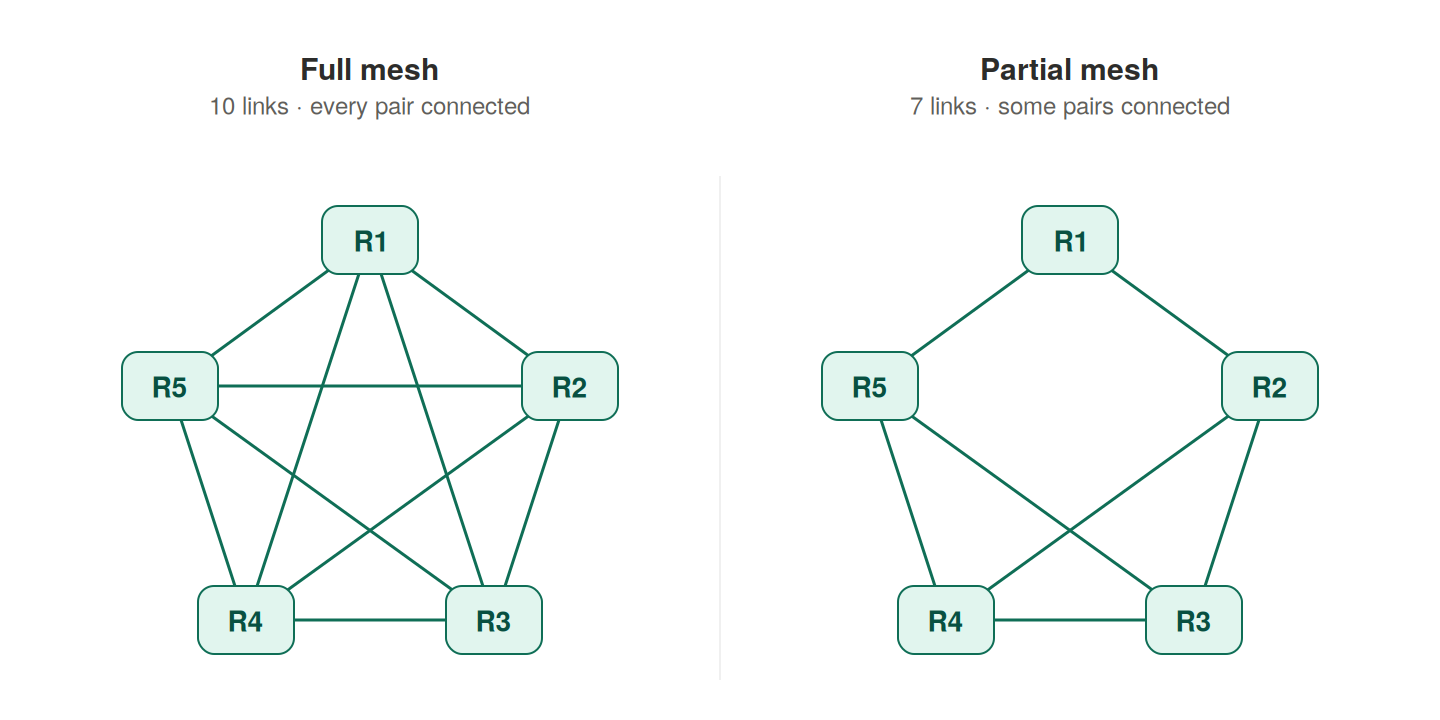
Here's some resources on wired network topologies:
In which wired network topology does every device have a direct connection to every other device on the network?
Network Devices
Routers
Routers are networking devices that connect different networks together and forward data/packets between them. The router sits between the Internet and the devices in your local area network (LAN). It assigns every connected device a private IP (Internet Protocol) address, using the DHCP (Dynamic Host Configuration Protocol) protocol to hand these out automatically.
When a device on a network requests data from a resource on the Internet, it sends a packet to the router. Devices on a local area network (LAN) are assigned private IP addresses, which cannot be routed across the public Internet.
The router uses Network Address Translation (NAT) to replace the packet's source private IP address with the router's public IP address. It also creates an entry in its NAT table that maps the device's private IP address and source port to the router's public IP address and a translated port number. This process, commonly called Port Address Translation (PAT), allows multiple devices to share a single public IP address.
The router examines the destination IP address and forwards the packet to the next hop, usually the Internet Service Provider (ISP). From there, routers across the Internet continue forwarding the packet until it reaches the destination server.
The server processes the request and sends a response back to the router's public IP address. When the response reaches the router, it looks up the translated port number in its NAT table, rewrites the destination back to the original private IP address and port, and forwards the packet to the correct device on the local network.
Hubs
Hubs are networking devices used to connect multiple devices on a network, and they're typically used in local area networks (LAN). Appearance wise, hubs look identical to switches but are very different in terms of what they do. When a hub receives data from a device, it repeats that data to all connected ports regardless of the intended recipient. In networking, hubs are considered "dumb" devices because all they do is repeat data. They operate at Layer 1 (Physical Layer) of the OSI model, and they aren't commonly used anymore, having largely been replaced by switches.
Switches
Switches are networking devices that look very similar to hubs but work very differently under the hood. They also connect multiple devices on a local area network (LAN), but they only forward data to the device the data was intended for. They do this by learning the MAC (Media Access Control) address of each device connected to the network. A MAC address typically looks like this:
00:1A:2B:3C:4D:5E
Let's imagine a scenario to understand how switches work. Say PC A wants to send data to PC B.
  ┌───────────────────────┐
  │        Switch         │
  └──┬─────────────────┬──┘
     │                 │
┌────┴────┐       ┌────┴────┐
│  PC A   │       │  PC B   │
└─────────┘       └─────────┘
The switch acts like a bridge between the two PCs. Every device on a network has both an IP address and a MAC address, and below are the IP and MAC addresses of both PCs.
| Device | IP Address | MAC Address |
|---|---|---|
| PC A | 192.168.1.10 | AA:AA:AA:AA:AA:AA |
| PC B | 192.168.1.20 | BB:BB:BB:BB:BB:BB |
PC A (192.168.1.10) wants to send data to PC B (192.168.1.20), but for that to be possible PC A needs to learn the MAC address of PC B. So how does it do that? Well, PC A first checks its ARP (Address Resolution Protocol) cache to see if it already has an entry for PC B's IP address. If it doesn't, it sends out an ARP request, which goes to the switch, and the switch then forwards that request to all its other connected devices asking who owns the destination IP address. PC B sees that the request is for its own IP, so it replies with its MAC address, and PC A stores that mapping in its ARP cache.
192.168.1.20 → BB:BB:BB:BB:BB:BB
Now PC A knows that 192.168.1.20 (PC B) corresponds to the BB:BB:BB:BB:BB:BB MAC address, so the next time it wants to send data to PC B, it just checks its ARP cache instead of asking again. The switch learns something too, but it's a different thing. It doesn't care about IP addresses at all, it only records which MAC address sits on which of its ports, and that's what it uses to forward frames to the right device.
The reason PC A needs to know the MAC address in the first place is because devices on a local network can only communicate with each other if they know the recipient's MAC address. IPs are used to figure out where traffic needs to go across networks, but the actual delivery within the local network happens using MAC addresses.
Access Points
An access point is a networking device that connects wireless devices such as phones and laptops to a wired local area network (LAN). Access points are kinda similar to hubs in that they broadcast the Wi-Fi signal out to all connected devices.
Modems
Modems are hardware devices that sit between home networks and the Internet Service Provider (ISP). They convert analog signals from a physical medium into digital data that devices on the network can understand, and they convert data going the other way back into analog signals.
Which network device learns the MAC address of each connected device so it can forward data only to the device it was intended for?